 GoQRM
A shared WhatsApp inbox that knows your customer
Connect your company WhatsApp Business number and your whole team replies from GoQRM – with the customer's inquiries, quotations and payments right beside the chat.
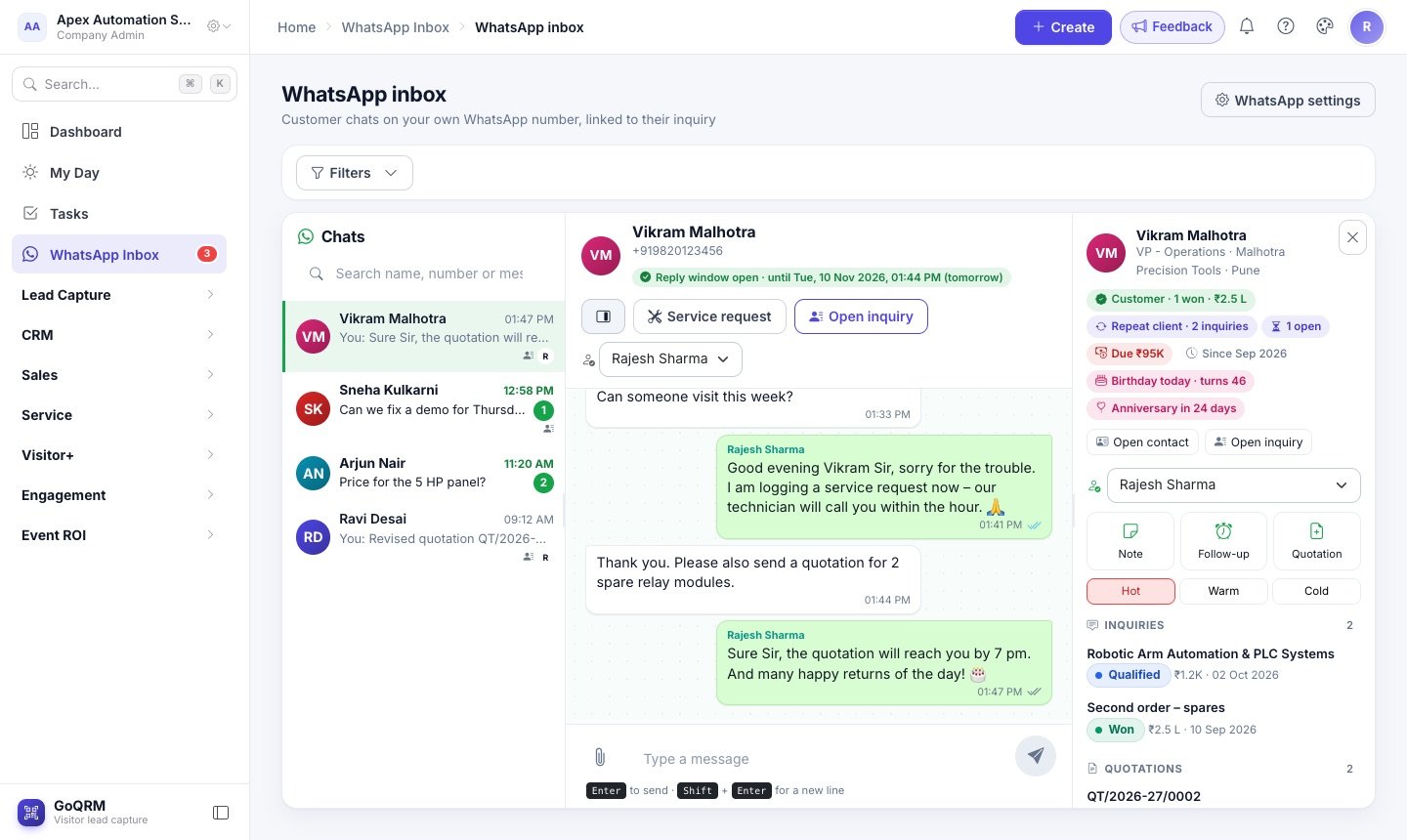
When customer chats live on one salesperson's phone, nobody else can see them, and they leave when that person leaves. The GoQRM WhatsApp Inbox brings every chat on your company number into one place, where you assign it to the right person and anyone with access can pick it up.
Each chat is matched to the customer by mobile number. Next to the conversation you see their inquiries with stage and value, quotations, invoices with what is still due, open follow-ups and even a birthday coming up. One click opens the inquiry, logs a note, adds a follow-up or starts a quotation.
How it works
Connect your number
Link your WhatsApp Business number with Meta in a few clicks – or keep using the WhatsApp Business app on the phone as well.
Chats arrive linked
Every message lands in the Inbox, matched to the contact and inquiry; new numbers can be added as an inquiry in one tap.
Reply as a team
Assign chats, reply from the company number, send photos and files, and use approved templates when the 24-hour window has closed.
What you get
Customer panel
Inquiries, quotations, invoices and amount due, follow-ups and birthdays beside every chat.
Photos and files
Photos, voice notes, videos and documents from customers, kept in GoQRM; send your own with the paperclip.
Service requests
Turn a complaint into a service request with the problem filled in from the chat.
Filters
Unread, mine, unassigned, can reply, repeat clients, open quotations, payment due.
Several numbers
Sales and support numbers in one inbox – you reply from the number the customer wrote to.
Templates with AI
Write WhatsApp message templates with an AI helper that follows Meta's rules, and send them for approval.
Questions and answers
Which plan includes the WhatsApp Inbox?
The Enterprise plan, which includes the Engagement module.
Do we need the WhatsApp Business API?
You need a WhatsApp Business number connected to Meta's Cloud API, which GoQRM sets up through Meta's own sign-up. Messages go from your number through your Meta account; GoQRM never sends under its own number.
Can we keep using the WhatsApp Business app on the phone?
Yes, where Meta allows it (coexistence): chats you type on the phone also appear in GoQRM.
Can several people answer the same number?
Yes. That is the point of the Inbox – assign each chat to a team member, and roles decide who may see and reply.
More about GoQRM
Try it at your next exhibition
Free trial with every feature switched on – no card needed.
Start free trial