 GoQRM
Customer contacts that remember everything about the person
Every visitor, caller and buyer becomes one contact with all their inquiries – and the small things that keep a customer: how they like to be greeted, their birthday, who referred them and who looks after them.
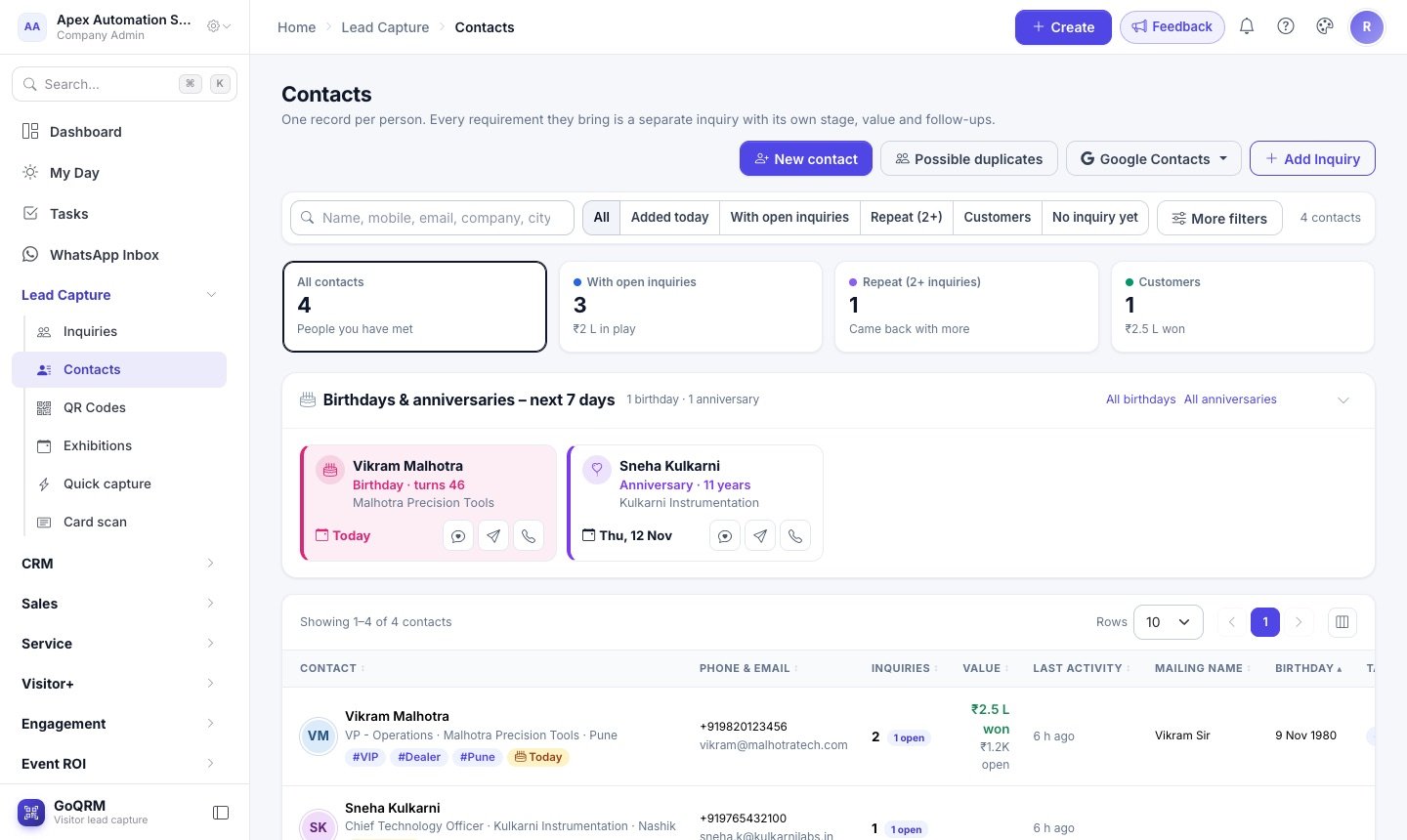
A customer who visited your stall last year, sent a WhatsApp enquiry in March and bought spares in June is one person – not three rows in three spreadsheets. GoQRM matches people by mobile number or email, so every new inquiry joins the contact you already have, with a combined timeline of calls, quotations, invoices and messages.
On top of the usual name, company and city, each contact can carry a mailing name ("Amit Sir"), a second calling number, birthday and anniversary, the contact who referred them, an owner in your team, a source and tags. Messages and campaigns greet people by their mailing name, and nobody's birthday slips by.
How it works
Contacts build themselves
QR scans, visiting cards, IndiaMART, WhatsApp and manual entries all land on the right person – no duplicates by mobile or email.
Add what you know
Mailing name, birthday, anniversary, referrer, owner, source and tags in one window. Add a person even before they ask for anything.
Stay in touch
Birthday and anniversary cards on My Day with a one-tap WhatsApp wish, filters on every field and campaigns to exactly the right group.
What you get
Birthdays and anniversaries
Who is due in the next 7 days, on My Day and the Contacts list, with Wish and Call buttons. Enterprise can send the wishes automatically.
Referrals
Note who referred each customer and see how many people your best sources have sent you.
Filter on anything
City, company, group, category, source, owner, tags, birthday month, inquiries, exhibition – and sort by any column.
Your columns
Choose which columns the list shows; GoQRM remembers it on your device.
To your phone and Google
Save a contact in your phone with one tap, or export to Google Contacts with the exhibition as a label (paid plans).
WhatsApp Inbox
Open a customer's chat with the wish already written and send it from your company number (Enterprise).
Questions and answers
What is the difference between a contact and an inquiry?
A contact is a person; an inquiry is one thing they want. One contact can have many inquiries – a machine this year and spares next year – each with its own stage, owner, quotation and follow-ups.
Can GoQRM send birthday wishes automatically?
Yes, on the Enterprise plan, through your own WhatsApp Business or SMS account from 9 am, once a day per person and never to people who opted out. On every plan you get a reminder card and a one-tap wish from your own WhatsApp.
Do I need the year of birth?
No. Day and month are enough; add the year if you want GoQRM to show the age or the number of years married.
Who can see a contact?
Admins see everyone. Other users see contacts linked to their own inquiries, the ones they added and the ones they own – following the roles and rights you set.
More about GoQRM
Try it at your next exhibition
Free trial with every feature switched on – no card needed.
Start free trial