 GoQRM
A QR code for your exhibition stall that brings in leads
Not just a link to your website: each GoQRM QR code opens your own visitor registration page and tells you who scanned, when, and who became a lead.
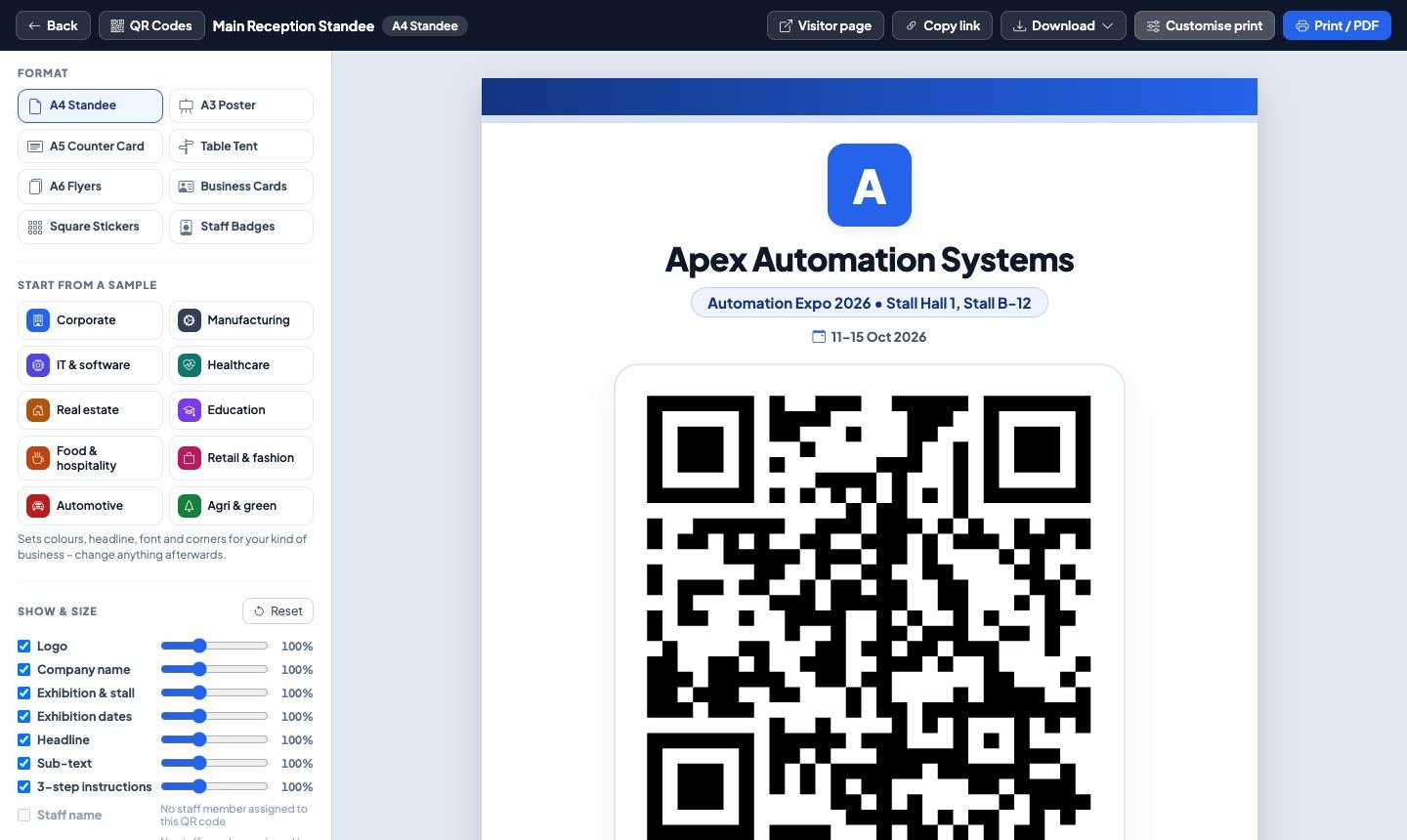
A QR code that only opens your website gives you nothing to follow up. A GoQRM QR code opens a short registration form with your logo, your products and a Save Contact button – and every form that is sent becomes an inquiry for your team.
You decide what the form asks for each exhibition: only the mobile number when the hall is packed, more details for a conference. The print studio lays the code out on standees, table tents, A6 flyers, business cards, stickers and staff badges, sized in real millimetres for printing.
How it works
Create the QR code
Pick the exhibition and the staff member or counter it belongs to. The code never changes, so print once and reuse it.
Design and print
Choose a format, colours, logo and text in the print studio and print it or save a PDF for your printer.
Watch it work
Scan details show scans, visitors, leads, busy hours, phones and languages for each code or exhibition.
What you get
8 print formats
A4 / A3 / A5 standees, table tents, A6 flyers, business cards, stickers and staff badges.
Your own form per show
Choose which fields to ask and show your products with prices.
Save Contact
Visitors save your contact card to their phone in one tap.
Scan details
Scans, returning visitors and leads by day and hour for every code.
NFC tap too
Use the same page with an NFC tag – taps are counted separately.
Play & win
Optional spin-the-wheel, scratch card or quiz after the form, with vouchers you set.
Questions and answers
How do I make a QR code for my exhibition stall?
Sign up for GoQRM, add your exhibition and create a QR code. Open the print studio, choose a standee, table tent, flyer or badge, and print it. Visitors who scan it see your registration form.
Will the QR code stop working after the exhibition?
No. A QR code keeps its address for good, so you can reuse printed standees at the next show. You can switch a code off whenever you like.
Can each salesperson have their own QR code?
Yes. Give every staff member a badge with their own code – their leads come straight to them.
What does the visitor see?
A short page with your company name and logo, the form you set up for that exhibition, your WhatsApp and Save Contact buttons, and a thank-you message.
More about GoQRM
Try it at your next exhibition
Free trial with every feature switched on – no card needed.
Start free trial